Using templates to speed up work on an online whiteboard
Whiteboard
Templates
2 min read
April 11, 2025
In remote and hybrid work, online whiteboards have become a valuable tool for employees who want to work effectively as a team. One of the key features of these platforms is ready-made templates, which significantly speed up workflows, make information easier to absorb and increase productivity.
Contents
What online whiteboard templates are and why you need them
Benefits
Examples of templates in popular online whiteboards
Tips for using templates effectively
What online whiteboard templates are and why you need them
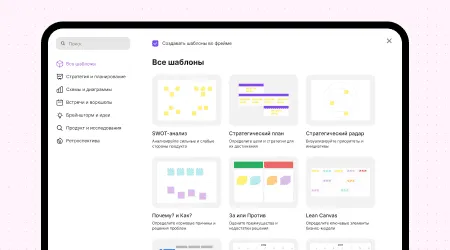
Online whiteboard templates are ready-made structures or layouts designed for specific tasks or processes. They can include various elements: tables, diagrams, flowcharts, mind maps and other visual components. Templates let teams get to work quickly, skipping the step of building a structure from scratch. This is especially useful for recurring tasks such as project planning, brainstorming or data analysis.
Benefits
Less time spent on structure: Ready-made templates let you start filling in content right away without spending time designing a layout. This is especially important when you need to respond quickly to changes.
Adaptable to your team's needs: Templates are flexible and can be modified to fit the requirements of a specific project or your team's working style. This allows for a tailored approach that meets specific needs.
Standardized processes: Using standard templates creates a consistent approach to tasks, which makes it easier for team members to understand each other and work together.
Higher productivity: Spending less time on preparation and keeping things simple increases the team's overall efficiency.
Examples of templates in popular online whiteboards
Miro: Offers an extensive library of ready-made templates, including diagrams, mind maps and business models, which significantly speeds up project kick-offs and makes it easier to visualize ideas.
Microsoft Whiteboard: Lets you insert templates that simplify project planning, brainstorming and collaboration. Users can choose from various template categories and adapt them to their tasks.
Trello: Offers templates for managing tasks and projects, letting teams brainstorm, plan, collaborate and celebrate wins.
flip: Templates help you quickly launch workflows — from brainstorming to sprint planning. Choose a ready-made structure, adapt it to your needs and get straight to work.
Tips for using templates effectively
Choose the right template: Before you start, figure out which template best fits the task at hand. This way, you'll get the most out of it.
Adapt the template: Don't limit yourself to the standard structure. Make changes and add or remove elements as needed so that the template fully meets your needs.
Train your team: Make sure all team members are familiar with the features of the chosen online whiteboard and know how to work with templates. This will increase overall efficiency and reduce the likelihood of mistakes.
Review and update regularly: Periodically review the templates you use, assess how well they work and adjust them as needed. This will keep them relevant to your current tasks.
Online whiteboard templates are a powerful tool for optimizing workflows, organizing information better and increasing team productivity. Adapting templates significantly reduces the time spent on preparation and lets you focus on your core tasks, which is especially important in a fast-changing work environment.
Authors

flip
Team