How multiple users can work on an online whiteboard at the same time
Team
Design
Case studies
Education
2 min read
April 12, 2025
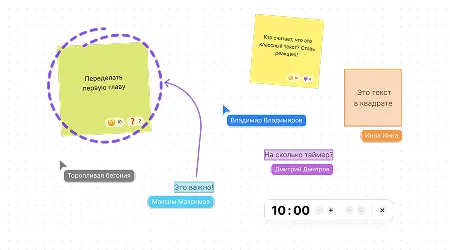
Remote work and distributed teams are becoming more and more common. In this setting, online whiteboards play a key role, letting multiple users work on projects together at the same time, share ideas and visualize information in real time. This makes teamwork much more efficient, cuts the time spent on approvals and improves communication between participants.
Contents
Key online whiteboard features for collaboration
Organizing effective teamwork on an online whiteboard
Examples of collaboration on online whiteboards
Tips for choosing an online whiteboard for collaboration
Technical requirements and compatibility
User training and support
Key online whiteboard features for collaboration
Online whiteboards offer a wide range of capabilities for working together:
Co-editing: several users can work on the same project at the same time, making changes and adding content in real time. This keeps everyone in sync and the process transparent.
Comments and annotations: participants can leave notes and discuss specific project elements right on the board, which leads to a deeper understanding of tasks and faster resolution of issues.
Templates: ready-made layouts for different tasks (for example, diagrams and mind maps) speed up work and keep information presented consistently.
Integration with other services: connecting to popular tools such as Jira, Slack, Zoom and Trello keeps work in sync and makes it easy to work across different platforms.
Organizing effective teamwork on an online whiteboard
To get the most out of collaborating on an online whiteboard, we recommend that you:
Set up access rights and member roles: decide which team members can edit, comment on or only view the board's content. This helps avoid unwanted changes and keeps the project structure intact.
Create structured workspaces and folders: organize information so that every member can easily find the materials they need and understand how the elements are arranged.
Use visual elements: sticky notes, color labels and other graphic tools help organize data, highlight priority tasks and make information clearer.
Plan and hold virtual meetings and brainstorming sessions: use the online whiteboard to run joint sessions where every participant can contribute, suggest ideas and discuss solutions in real time.
Examples of collaboration on online whiteboards
Online whiteboards are used in many fields:
Creating and editing mind maps together: lets teams visualize ideas, structure information and develop strategies.
Developing and tracking projects with kanban boards: the kanban method helps manage tasks effectively, track their status and distribute the workload among team members.
Running interactive training sessions and workshops: online whiteboards provide tools for dynamic, engaging learning events where participants can actively engage with the material and with each other.
Visualizing user journeys and processes: helps teams analyze and optimize how users interact with a product, identify bottlenecks and suggest improvements.
Tips for choosing an online whiteboard for collaboration
When choosing a tool for teamwork, consider the following:
Functionality: make sure the platform provides everything your team needs, including co-editing, comments, templates and integrations.
Cost: evaluate the service's pricing, whether there are free versions or trial periods, and whether the price matches the features offered.
Ease of use: an intuitive interface that's easy to learn helps your team adapt to the new tool faster and get productive.
Integration options: check whether the online whiteboard can connect to other services and tools your team already uses.
Security and privacy when collaborating on online whiteboards
When organizing collaboration on online whiteboards, it's important to consider security and data protection. Since multiple users access a shared space, you need to keep information safe and prevent unauthorized access. To do this, we recommend that you:
Choose platforms with reliable authentication and authorization. For example, services that support multi-factor authentication provide an extra layer of protection.
Set access rights according to member roles. Clearly defining who can edit, comment on or only view the board's content helps prevent accidental or deliberate changes.
Use platforms that comply with data protection standards. Make sure the service you choose follows international security standards and has positive user reviews.
Technical requirements and compatibility
Before bringing an online whiteboard into your workflow, it's important to assess the technical requirements and compatibility with the devices and operating systems you use. Some platforms may require additional apps or plugins, while others work right in a web browser. We recommend that you:
Check compatibility with major browsers and devices. This makes the tool available to all team members, whatever technology they use.
Assess the internet connection requirements. A stable online whiteboard experience often depends on the speed and reliability of the internet connection, especially when several users work at once.
User training and support
To successfully bring an online whiteboard into your workflow, you need to train employees and give them access to support resources. This helps minimize the time it takes to adapt and makes the tool more effective. We recommend that you:
Run training sessions and webinars on the chosen platform. This helps users get to know its features and best practices.
Provide access to reference materials and guides. Documentation helps users resolve questions on their own and deepen their knowledge of the platform.
Set up a channel for feedback and support. An internal or external support team makes it possible to solve technical problems quickly and get advice on using the tool.
Bringing online whiteboards into your workflow opens up new horizons for teams, letting them interact effectively, share ideas and achieve their goals no matter where the participants are. Adopting such tools boosts productivity, improves communication and speeds up workflows. Choose your platform carefully, taking into account your team's needs and specifics, to unlock the full potential of collaboration in a digital environment.
Authors

flip
Team