Building digital habits: using a whiteboard in your daily routine
Team
Whiteboard
2 min read
May 14, 2025
Building lasting digital habits is one of the key challenges in today's work and learning environments. Tools, even the most feature-rich ones, are useless without regular use. Online whiteboards are an effective solution: they let you build structure, set up collaboration, automate recurring processes and reinforce useful everyday actions.
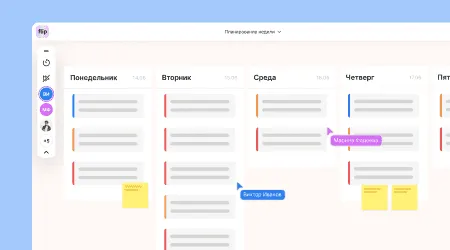
How a whiteboard helps reinforce digital habits
Visual collaboration platforms were designed from the start as flexible environments suited to any task. It's this flexibility that lets you use a board as the basis of your daily activity. Key mechanics:
Regularly updating tasks in the same visual format.
Templates for daily planning and retrospectives.
Tying routine processes (meetings, reviews, checklists) to permanent blocks on the board.
Using visual triggers and color coding for prioritization.
Setting up automatic reminders or calendar integrations.
By presenting information visually, the board reduces cognitive load and makes it easier to form lasting digital patterns.
Examples of routine scenarios for employees, teachers and teams
An online whiteboard becomes useful when it is part of your regular task cycle. Here are some common ways to use it:
Morning stand-ups. The team syncs up using the board: tasks by sprint or by day are displayed visually, and blockers and progress are recorded.
Personal planning. Employees set up their own areas where they track priorities, meetings and micro-goals for the day.
Feedback. The board as a space for collecting and commenting on ideas and initiatives asynchronously.
Class preparation. Teachers gather visual materials, modules and reference diagrams into a course structure.
Reflection and analysis. Weekly or monthly retrospectives using cards or engagement charts.
The key to effectiveness is regularity. Repeating the same pattern creates a lasting habit.
How to build a whiteboard into daily processes: a step-by-step strategy
Integrating a whiteboard into your routine takes minimal planning, and the result pays off many times over. Here's how:
Step 1. Set the rhythm: decide at what points in the day or week the board will be used (for example, every day at 10:00, with reflection every Friday).
Step 2. Create templates: identify the main activities (daily tasks, meetings, planning) and turn them into recurring blocks.
Step 3. Assign areas of responsibility: if it's a team board, decide who is responsible for what to minimize gaps.
Step 4. Connect it to other systems: use integrations with email, calendars and task trackers for automation.
Step 5. Analyze activity: track which areas of the board are used most and what gets ignored — this will help you adjust the structure.
This approach minimizes resistance and helps users adapt faster.
How a visual whiteboard shapes a culture of digital maturity
The digital maturity of a team or learning process depends not only on the tools it uses but also on how they are adopted. In this context, the board becomes:
A single source of truth — all up-to-date information is in one place.
A space for self-organization — users manage their own tasks, time and priorities.
A tool for asynchronous communication — it doesn't require being online all the time.
A feedback mechanism — it's easy to collect responses and make collective decisions.
A catalyst for team transparency — everyone's activity, progress and contribution are visible.
In this way, the board affects not only individual habits but also the maturity of the entire team.
Conclusion: a whiteboard as a habit, not a project
Building lasting digital habits starts small: regularly using simple templates, turning to the board every day and gradually making its structure more complex. The online whiteboard stops being a temporary project solution and becomes an integral part of your day — like your calendar, email or messenger.
It's this kind of integration that makes a board useful not only for individual cases but in everyday practice. It simplifies decision-making, improves collaboration, reduces routine errors and makes the workflow more mindful. The habit of using a board every day is an investment in productivity.
Authors

flip
Team