Why is a simple online whiteboard interface a good thing?
Whiteboard
Team
2 min read
April 23, 2025
In the world of digital tools, the winner is the one you can figure out quickly and start working with right away. This is especially true for online whiteboards, where what matters is not only functionality but also how easy the tool is to use. In this context, a simple interface is not a compromise but a powerful advantage.
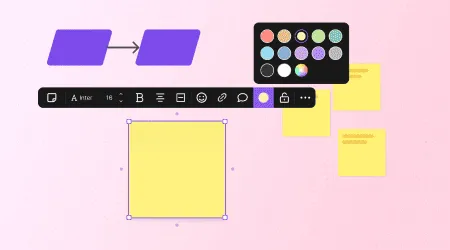
What a “simple interface” means in an online whiteboard
A simple online whiteboard interface is one where the controls are intuitive, don't clutter the screen and let users focus on the task rather than on hunting for the right button. It means:
a minimum of panels and tabs;
clear icons;
a logical layout of tools;
no unnecessary visual effects.
An online whiteboard with a simple interface needs no instructions — everything is clear at first glance.
Benefits of a simple interface
A minimalist interface has many benefits. Here are the key ones:
Fast onboarding for new users. This is especially important in teams with different levels of digital literacy.
Lower cognitive load. Users don't have to spend energy figuring out how the toolbar is structured.
Focus on content. The tool doesn't distract: all attention goes to ideas, tasks and results.
Faster workflows. The fewer the clicks, the faster tasks get done.
Versatility. One interface works for brainstorming, design work and learning alike.
An online whiteboard should be a helper, not a technical barrier.
Comparison: simple vs. cluttered interface
To better understand the value of simplicity, let's compare two types of interfaces:
Simple interface:
a clean workspace;
only the features you need;
easy access to templates and objects;
a quick start with no training.
Cluttered interface:
lots of buttons and menus;
complex settings;
“visual noise”;
heavy reliance on training materials.
With a simple interface, you can get to work in just 2–3 minutes. A cluttered one requires preparation and often puts beginners off.
What makes an interface convenient
Creating an effective interface isn't about minimalism for the sake of design. What matters is keeping it useful without making it harder to understand. Here's what makes an interface truly convenient:
A minimum of clicks to the action you need — everything is at hand.
Keyboard shortcuts and key combinations — they save time.
Hover tooltips — especially useful for beginners.
A clear object hierarchy — users don't get lost in layers.
Flexible handling of elements — dragging, scaling, duplicating.
A convenient online whiteboard is one that lets you work without being distracted by the interface. flip is a prime example of this approach.
Authors

flip
Team