Payment methods: card or invoice
Updated June 21, 2024
You can pay for flip plans by card or by invoice
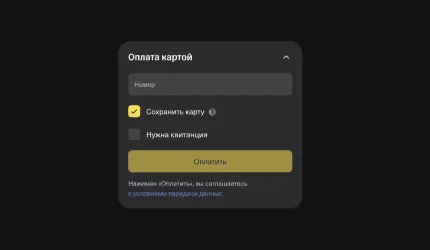
You can link a card when you make your first payment: make sure the Save card box is checked when you pay:
Your company's billing details will be added after the first payment:
After the payment, Payer information will appear in the Payment information section.
You can always see the date of your next payment in Payment information → My subscription. If less than a month is left before the next payment, a warning will appear in Payment methods.
If you upgrade your plan, your billing period and renewal date will change. The prorated amount for the plan will be applied as part of the payment on the new invoice
- We accept Visa, Mastercard and Mir cards
- Invoices are available for all paid plans
How to link a card for payment
You can link a card when you make your first payment: make sure the Save card box is checked when you pay:
How to unlink a card
- In the space settings, go to the Payment information section. On the Payment method tab, click Unlink card.
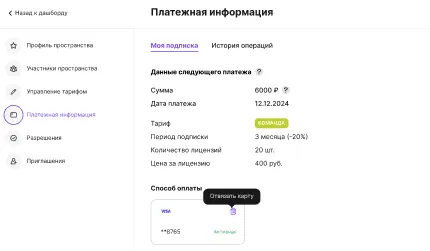
- Confirm that you want to remove the card. If no linked cards remain, you will need to enter your payment details again to renew your subscription.Please note
If no payment method has been added by the time the plan payment is due, your plan will automatically change to Mini.
How to set up payment by corporate invoice
Your company's billing details will be added after the first payment:
- When choosing a paid plan, select By corporate invoice as the payment method.
- Enter your contact details — an operator will contact you to prepare the invoice.
After the payment, Payer information will appear in the Payment information section.
How to renew your plan when paying by invoice
You can always see the date of your next payment in Payment information → My subscription. If less than a month is left before the next payment, a warning will appear in Payment methods.
- Click the Renew plan button
- If needed, change the Number of licenses and the Subscription period.
- Click Continue. Your plan will be renewed once the new invoice is paid.
Please note
If the invoice has not been paid by the time the plan is due for renewal, your plan will automatically change to Mini.
What happens when you cancel your subscription
If the invoice has not been paid by the time the plan is due for renewal, your plan will automatically change to Mini.
What happens when you cancel your subscription
If you upgrade your plan, your billing period and renewal date will change. The prorated amount for the plan will be applied as part of the payment on the new invoice
More on billing and payments
Billing and payments in flip
How flip pricing is calculated
Where to find invoices and receipts in flip
More helpful articles
How to install the extension and download a board from Miro
Where to find invoices and receipts in flip
What flip is and how to use it
The Mini plan: features and limitations
Logging in to your flip account: instructions
How to downgrade your plan
How flip pricing is calculated
How to invite users to a space
How to install the extension and download a board from Miro
Logging in to your flip account: instructions
Where to find invoices and receipts in flip
How to downgrade your plan
What flip is and how to use it
How flip pricing is calculated
The Mini plan: features and limitations
How to invite users to a space