Where to find invoices and receipts in flip
Updated June 21, 2024
If you pay by corporate invoice
- When choosing a paid plan, select By corporate invoice as the payment method.
- Enter your contact details — an operator will contact you to confirm the details. The operator will prepare the invoice and send it to your email.
Payment receipts
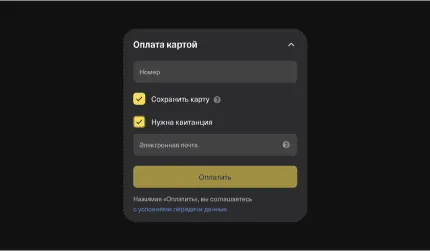
If you need a receipt, don't forget to check I need a receipt and enter your email address.
Once the payment has been made, you can get a receipt only by contacting support.
Once the payment has been made, you can get a receipt only by contacting support.
More on billing and payments
Billing and payments in flip
Payment methods: card or invoice
How flip pricing is calculated
More helpful articles
How flip pricing is calculated
Signing up for flip as a new user
How to install the extension and download a board from Miro
What happens when you cancel your subscription
How to invite users to a space
Payment methods: card or invoice
Adding and removing members in a space
Creating and editing flips: a step-by-step guide
How flip pricing is calculated
How to invite users to a space
Signing up for flip as a new user
Payment methods: card or invoice
How to install the extension and download a board from Miro
Adding and removing members in a space
What happens when you cancel your subscription
Creating and editing flips: a step-by-step guide