Logging in to your flip account: instructions
Updated June 21, 2024
To log in to flip:
If you don't have a flip account, you can sign up.
If you forgot your password or want to change it, reset it and set a new one:
You can now log in to your account with the new password.
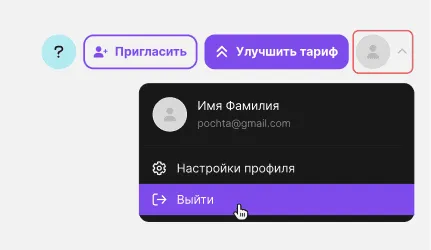
To log out, click your profile and then Log out:
- Go to the login page.
- Enter your login details: the email and password you used to sign up.
- Click Log in.
If you don't have a flip account, you can sign up.
If you forgot your password or want to change it, reset it and set a new one:
- Click Forgot password on the login page or follow this link.
- Enter the email you used to sign up, or the one your invitation to the space was sent to.
- Click Request link.
- Follow the link in the email from flip.
- Come up with a new password for your account, then enter it and repeat it.
- Click Confirm.
Please note that the password must be at least 8 characters long and must not contain special characters.
You can now log in to your account with the new password.
To log out, click your profile and then Log out:
More helpful articles
How to invite users to a space
What flip is and how to use it
Where to find invoices and receipts in flip
Image generation in flip